Cervical Screening (smear) Online Booking Instructions
To book your cervical screening (smear) appointment please make sure you have access to Patient Services and then follow the below instructions.
If you don't have access to Patient Services please visit our Prescriptions page to complete the required form, or contact reception.
- Log in to www.patient-services.co.uk in the usual way.
- Select My Appointments, and the Appointment screen displays showing any appointments you already have booked.
- To book a new appointment, select + Add New Appointment.
- The Appointments Search Filter screen displays, to fine tune the appointments that display, select your preferences :
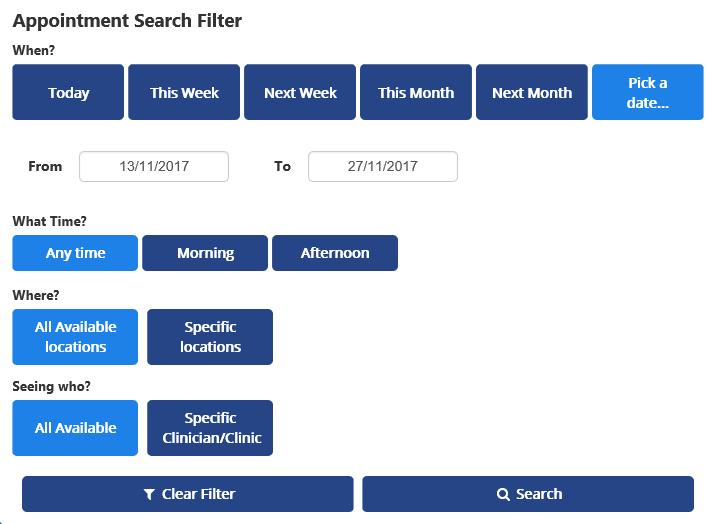
- The slots matching your request display. If there are no appointments available a 'Why are there no Appointments?' link displays, this links to Appointments help and advises you to contact your surgery.
- Select Book against the appointment you require.
- The Confirm your booking screen displays. Check the details carefully, and enter a Reason for the appointment.
- Select Confirm to book the appointment.
- The Appointment Booked Successfully screen displays along with your appointment details.
- (Optional) Select Save to Calendar to save the details to your electronic calendar.
- (Optional) Select Print to print your appointment details.
Note - You will receive an SMS booking confirmation and a reminder the day before your appointment is due. If your appointment booking fails, the 'Your booking was not successful, there was an error while attempting to book your chosen appointment' message displays. Select Add New Appointment to reselect and book the appointment.
Page last reviewed: 28 January 2026
Page created: 28 January 2026
Page created: 28 January 2026